Presentation exercise: The biggest pet peeves of dog owners nationwide and in each state (by Forbes)

Part I: Recreating graph”

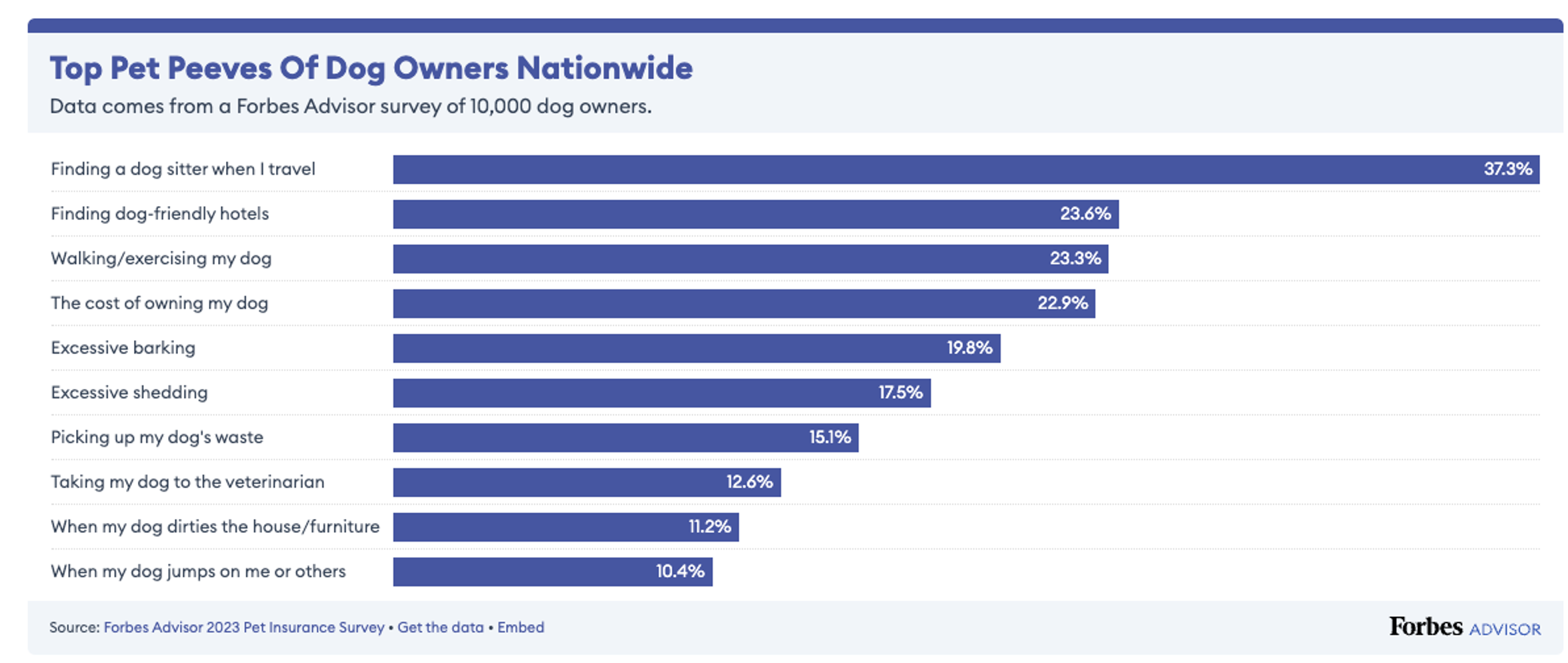
For this exercise I will recreate the graph from Forbes website available here:

The biggest pet peeves of dog owners nationwide and in each state

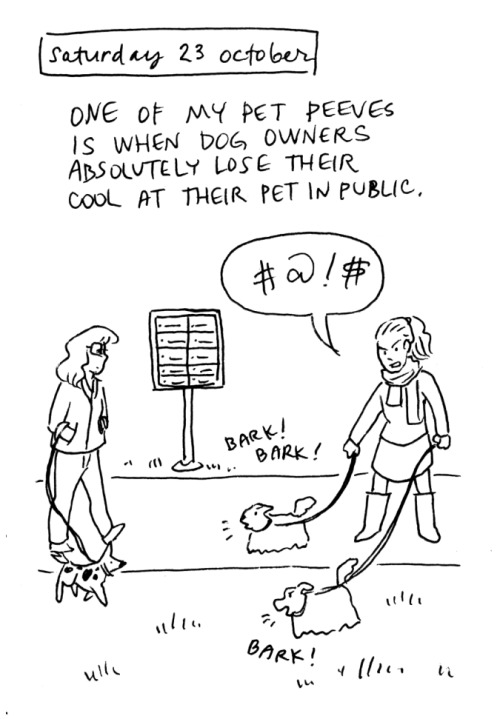
For breaking the ice, here is one of mine:

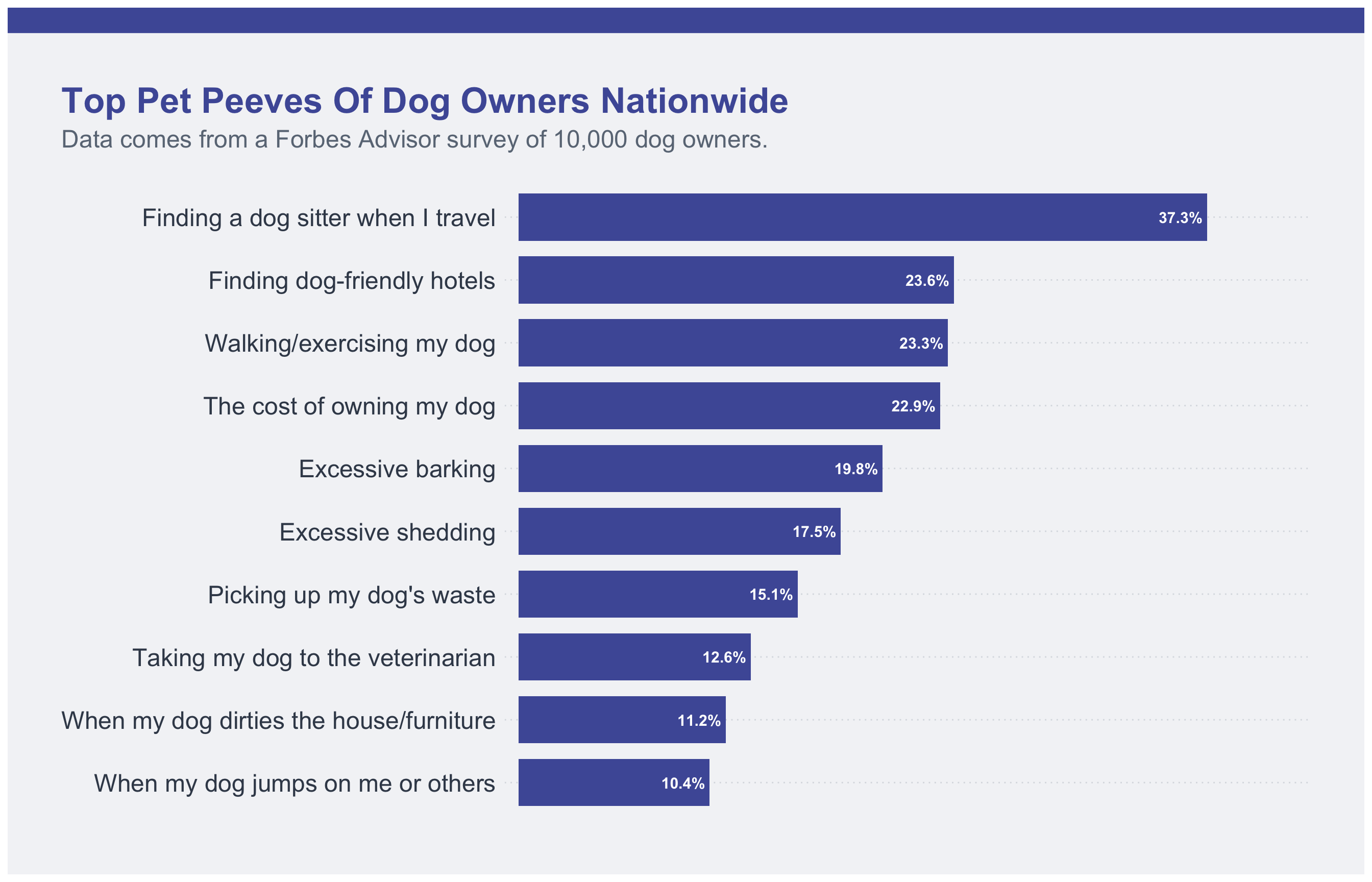
To reproduce this graph first we will import its data file: Top_Pet_Peeves_Of_Dog_Owners_Nationwide.csv

library(tidyverse)
Warning: package 'ggplot2' was built under R version 4.4.3
Warning: package 'tibble' was built under R version 4.4.3
Warning: package 'tidyr' was built under R version 4.4.3
Warning: package 'readr' was built under R version 4.4.3
Warning: package 'purrr' was built under R version 4.4.3
Warning: package 'dplyr' was built under R version 4.4.3
Warning: package 'lubridate' was built under R version 4.4.3
── Attaching core tidyverse packages ──────────────────────── tidyverse 2.0.0 ──
✔ dplyr     1.2.0     ✔ readr     2.2.0
✔ forcats   1.0.1     ✔ stringr   1.6.0
✔ ggplot2   4.0.2     ✔ tibble    3.3.1
✔ lubridate 1.9.5     ✔ tidyr     1.3.2
✔ purrr     1.2.1     
── Conflicts ────────────────────────────────────────── tidyverse_conflicts() ──
✖ dplyr::filter() masks stats::filter()
✖ dplyr::lag()    masks stats::lag()
ℹ Use the conflicted package (<http://conflicted.r-lib.org/>) to force all conflicts to become errors
library(scales)

Attaching package: 'scales'

The following object is masked from 'package:purrr':

    discard

The following object is masked from 'package:readr':

    col_factor
library(here)
here() starts at /Users/ayllaermland/Downloads/BIOS8060E/AyllaErmland-portfolio
library(patchwork)
#Read csv file
forbs_data <- read_csv(
  here("presentation-exercise",
       "Top_Pet_Peeves_Of_Dog_Owners_Nationwide.csv")
)
Rows: 10 Columns: 2
── Column specification ────────────────────────────────────────────────────────
Delimiter: ","
chr (2): Pet peeve, Percentage of respondents

ℹ Use `spec()` to retrieve the full column specification for this data.
ℹ Specify the column types or set `show_col_types = FALSE` to quiet this message.
#Clean percentage column
forbs_data <- forbs_data %>%
  mutate(
    percentage = parse_number(`Percentage of respondents`) / 100
  )

colnames(forbs_data)
[1] "Pet peeve"                 "Percentage of respondents"
[3] "percentage"               
#Order rows that shows in the graph:

forbs_data <- forbs_data %>%
  mutate(
    `Pet peeve` = forcats::fct_reorder(`Pet peeve`, percentage)
  )
#Define Forbes blue
forbes_blue <- "#4E5BA6"


p <- ggplot(forbs_data, aes(x = percentage, y = `Pet peeve`)) +
  
  #Bars
  geom_col(fill = forbes_blue, width = 0.75) +
  
  #Percent labels
  geom_text(aes(label = percent(percentage, accuracy = 0.1)),
            hjust = 1.1,
            color = "white",
            size = 4,
            fontface = "bold") +
  
  #Add breathing space
  scale_x_continuous(
    expand = expansion(mult = c(0.02, 0.15))
  ) +
  
  #Titles
  labs(
    title = "Top Pet Peeves Of Dog Owners Nationwide",
    subtitle = "Data comes from a Forbes Advisor survey of 10,000 dog owners.",
    x = NULL,
    y = NULL
  ) +
  
  #Theme styling
  theme_minimal(base_size = 14) +
  theme(
    plot.background = element_rect(fill = "#F3F4F6", color = NA),
    panel.background = element_rect(fill = "#F3F4F6", color = NA),
    
    plot.title.position = "plot",
    plot.title = element_text(
      face = "bold",
      size = 26,
      color = forbes_blue,
      hjust = 0
    ),
    plot.subtitle = element_text(
      size = 18,
      color = "#6B7785",
      hjust = 0,
      margin = margin(b = 20)
    ),
    
    axis.text.y = element_text(size = 18, color = "#3C4858"),
    axis.text.x = element_blank(),
    axis.ticks = element_blank(),
    
    panel.grid.major.x = element_blank(),
    panel.grid.minor = element_blank(),
    panel.grid.major.y = element_line(
      color = "#DADDE2",
      linewidth = 0.5,
      linetype = "dotted"
    ),
    
    plot.margin = margin(t = 40, r = 40, b = 40, l = 40)
  )

#Making the blue headed bar
top_bar <- ggplot() +
  theme_void() +
  theme(
    plot.background = element_rect(fill = forbes_blue, color = NA)
  )

#Combining the head bar and plot
(top_bar / p) +
  plot_layout(heights = c(0.04, 1))

Part II: Recreating Table

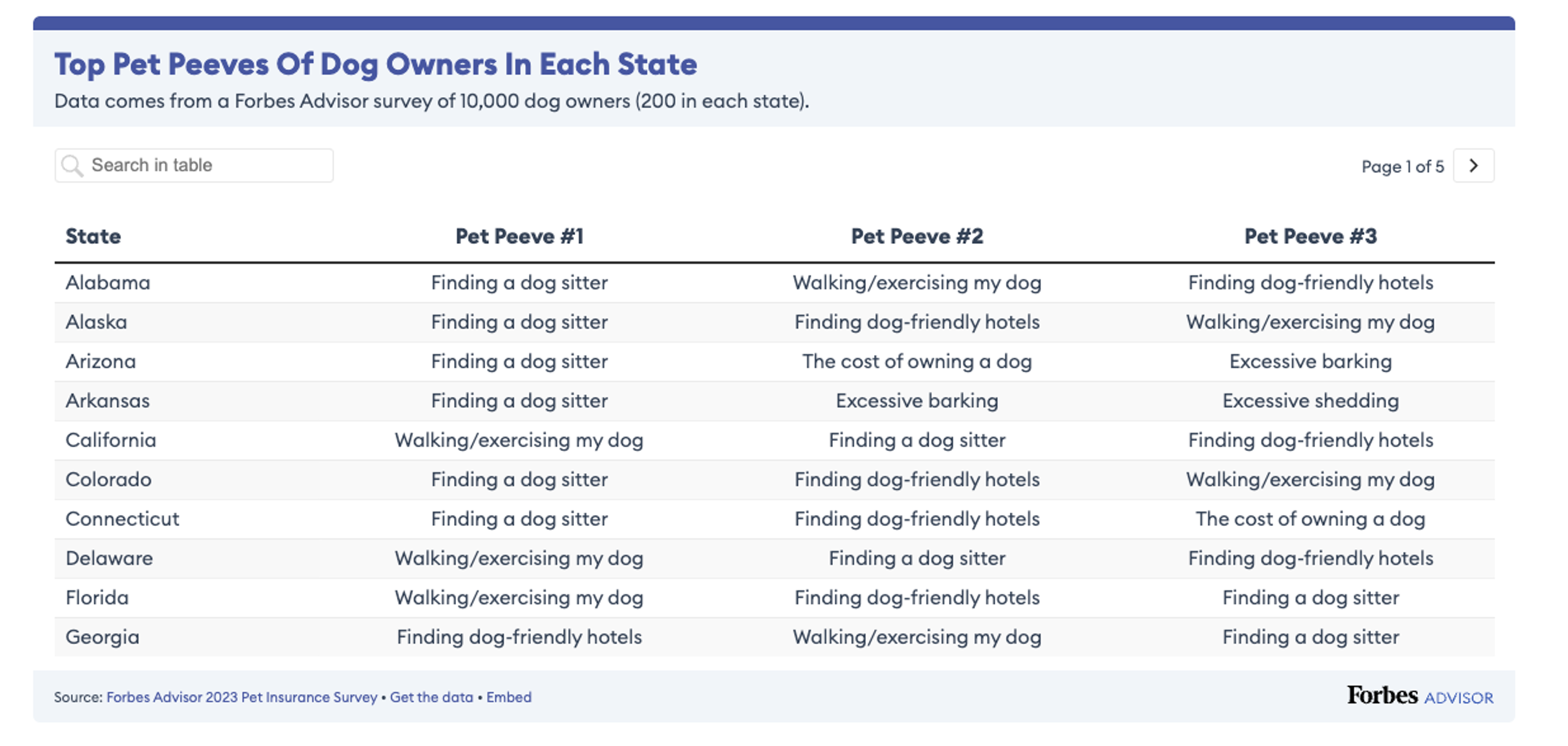
The table I will recreate is in the same website and represents the top pet peeves of dog owners in each state:

library(gt)
Warning: package 'gt' was built under R version 4.4.3
state_data <- read_csv(
  here("presentation-exercise",
       "Top_pet_peeves_of_dog_owners_in_each_state.csv")
)
Rows: 50 Columns: 4
── Column specification ────────────────────────────────────────────────────────
Delimiter: ","
chr (4): State, ~~~Pet Peeve #1~~~, ~~~Pet Peeve #2~~~, ~~~Pet Peeve #3~~~

ℹ Use `spec()` to retrieve the full column specification for this data.
ℹ Specify the column types or set `show_col_types = FALSE` to quiet this message.
colnames(state_data)
[1] "State"              "~~~Pet Peeve #1~~~" "~~~Pet Peeve #2~~~"
[4] "~~~Pet Peeve #3~~~"
state_data <- read_csv(
  here("presentation-exercise",
       "Top_pet_peeves_of_dog_owners_in_each_state.csv")
)
Rows: 50 Columns: 4
── Column specification ────────────────────────────────────────────────────────
Delimiter: ","
chr (4): State, ~~~Pet Peeve #1~~~, ~~~Pet Peeve #2~~~, ~~~Pet Peeve #3~~~

ℹ Use `spec()` to retrieve the full column specification for this data.
ℹ Specify the column types or set `show_col_types = FALSE` to quiet this message.
colnames(state_data)
[1] "State"              "~~~Pet Peeve #1~~~" "~~~Pet Peeve #2~~~"
[4] "~~~Pet Peeve #3~~~"
state_data <- state_data %>%
  rename(
    state = State,
    pet_peeve_1 = `~~~Pet Peeve #1~~~`,
    pet_peeve_2 = `~~~Pet Peeve #2~~~`,
    pet_peeve_3 = `~~~Pet Peeve #3~~~`
  )
colnames(state_data) <- c(
  "state",
  "pet_peeve_1",
  "pet_peeve_2",
  "pet_peeve_3"
)

forbes_blue <- "#4E5BA6"

state_table <- state_data %>%
  gt() %>%
  
  cols_label(
    state = "State",
    pet_peeve_1 = "Pet Peeve #1",
    pet_peeve_2 = "Pet Peeve #2",
    pet_peeve_3 = "Pet Peeve #3"
  ) %>%
  
  tab_header(
    title = md("**Top Pet Peeves Of Dog Owners In Each State**"),
    subtitle = "Data comes from a Forbes Advisor survey of 10,000 dog owners (200 in each state)."
  ) %>%
  
  tab_style(
    style = cell_text(
      color = forbes_blue,
      weight = "bold",
      size = "x-large"
    ),
    locations = cells_title(groups = "title")
  ) %>%
  
  tab_style(
    style = list(
      cell_text(weight = "bold"),
      cell_fill(color = "#F3F4F6")
    ),
    locations = cells_column_labels(everything())
  ) %>%
  
  opt_row_striping() %>%
  
  tab_options(
    table.border.top.color = forbes_blue,
    table.border.top.width = px(8),
    table.background.color = "#F3F4F6",
    heading.background.color = "#F3F4F6",
    data_row.padding = px(10)
  ) %>%
  
  #Automatic conditional formatting
  tab_style(
    style = cell_fill(color = "#DCE3F5"),
    locations = cells_body(
      columns = pet_peeve_1,
      rows = pet_peeve_1 == "Finding a dog sitter"
    )
  ) %>%
  
  tab_source_note(
    source_note = md(
      "*Source:* [Forbes Advisor 2023 Pet Insurance Survey](https://www.forbes.com/advisor/insurance/pet-insurance-pet-peeves-by-state/)"
    )
  )

state_table
Top Pet Peeves Of Dog Owners In Each State
Data comes from a Forbes Advisor survey of 10,000 dog owners (200 in each state).
State Pet Peeve #1 Pet Peeve #2 Pet Peeve #3
Alabama Finding a dog sitter Walking/exercising my dog Finding dog-friendly hotels
Alaska Finding a dog sitter Finding dog-friendly hotels Walking/exercising my dog
Arizona Finding a dog sitter The cost of owning a dog Excessive barking
Arkansas Finding a dog sitter Excessive barking Excessive shedding
California Walking/exercising my dog Finding a dog sitter Finding dog-friendly hotels
Colorado Finding a dog sitter Finding dog-friendly hotels Walking/exercising my dog
Connecticut Finding a dog sitter Finding dog-friendly hotels The cost of owning a dog
Delaware Walking/exercising my dog Finding a dog sitter Finding dog-friendly hotels
Florida Walking/exercising my dog Finding dog-friendly hotels Finding a dog sitter
Georgia Finding dog-friendly hotels Walking/exercising my dog Finding a dog sitter
Hawaii Finding a dog sitter The cost of owning a dog Finding dog-friendly hotels
Idaho Finding a dog sitter Excessive barking Excessive shedding
Illinois Finding a dog sitter Finding dog-friendly hotels The cost of owning a dog
Indiana Finding a dog sitter Picking up my dog's waste Excessive barking
Iowa Finding a dog sitter Walking/exercising my dog Finding dog-friendly hotels
Kansas Finding a dog sitter Walking/exercising my dog Excessive shedding
Kentucky Finding a dog sitter Excessive barking Excessive shedding
Louisiana Finding a dog sitter Finding dog-friendly hotels Excessive shedding
Maine Finding a dog sitter Excessive barking Finding dog-friendly hotels/Cost of owning a dog
Maryland Finding a dog sitter Finding dog-friendly hotels Walking/exercising my dog
Massachusetts Finding a dog sitter The cost of owning a dog Walking/exercising my dog
Michigan Finding a dog sitter The cost of owning a dog Picking up my dog's waste
Minnesota Finding a dog sitter The cost of owning a dog Finding dog-friendly hotels
Mississippi Finding a dog sitter The cost of owning a dog/Excessive barking Excessive shedding
Missouri Finding a dog sitter Excessive shedding Excessive barking
Montana Finding a dog sitter Picking up my dog's waste Finding dog-friendly hotels
Nebraska Finding a dog sitter Excessive barking Excessive shedding
Nevada Finding a dog sitter The cost of owning a dog/Excessive barking Finding dog-friendly hotels
New Hampshire Finding a dog sitter Excessive barking Excessive shedding
New Jersey Finding a dog sitter Finding dog-friendly hotels The cost of owning a dog
New Mexico Finding a dog sitter Excessive barking Excessive shedding
New York Walking/exercising my dog Finding a dog sitter Finding dog-friendly hotels
North Carolina Finding a dog sitter The cost of owning a dog Finding dog-friendly hotels
North Dakota Finding a dog sitter Excessive shedding Excessive barking
Ohio Finding a dog sitter Excessive shedding Excessive barking
Oklahoma Finding a dog sitter Excessive barking The cost of owning a dog
Oregon Finding a dog sitter Picking up my dog's waste Excessive barking
Pennsylvania Walking/exercising my dog Finding a dog sitter The cost of owning a dog
Rhode Island Finding a dog sitter Walking/exercising my dog The cost of owning a dog
South Carolina Finding a dog sitter The cost of owning a dog Finding dog-friendly hotels
South Dakota Finding a dog sitter The cost of owning a dog Excessive shedding
Tennessee Finding a dog sitter Excessive shedding Excessive barking
Texas Finding a dog sitter Walking/exercising my dog Finding dog-friendly hotels
Utah Finding a dog sitter Excessive barking Finding dog-friendly hotels
Vermont Finding a dog sitter The cost of owning a dog/Excessive shedding Excessive barking
Virginia Finding a dog sitter Finding dog-friendly hotels The cost of owning a dog
Washington Walking/exercising my dog Finding a dog sitter The cost of owning a dog
West Virginia Finding a dog sitter Finding dog-friendly hotels The cost of owning a dog
Wisconsin Finding a dog sitter Excessive barking The cost of owning a dog
Wyoming Finding a dog sitter Finding dog-friendly hotels Excessive barking
Source: Forbes Advisor 2023 Pet Insurance Survey

Some of the prompts used for this exercise:

Recreate the figure from this site https://www.forbes.com/advisor/insurance/pet-insurance-pet-peeves-by-state/ more specifically the Top Pet Peeves Of Dog Owners Nationwide, using the csv file already downloaded. csv formatting row example: Pet peeve; Percentage of respondents; Finding a dog sitter when I travel; 37.34% The graph needs to be generated using R and ggplot2, the graph have a top bar in blue and bold title in blue also.

For creating interactive footnotes in the table: For the footnotesm I want “[TEXT]” clickable/interactive in the [LOCATION] linking to [URL]. How do I do that?